Les membres ayant 30 points peuvent parler sur les canaux annonces, projets et hs du chat.
La shoutbox n'est pas chargée par défaut pour des raisons de performances. Cliquez pour charger.
Menu
Calculatrices
Graph 35 à 100
Graph 25+Pro/25+E/25+E II
Graph 35+USB/75(+E)/85/95 SD
Graph 100(+)
Classpad 300/330(+)
fx-CG 10/20 (Prizm)
Classpad 400(+E)
Graph 90+E
fx-92+ SC
Liens
¤ Transférer un programme sur
sa calculatrice

¤ Vous cherchez une fonction ?
Jeux >> Graph 35+USB/75(+E)/85/95 SD >> Réflexion >> Klondike Solitaire
Klondike Solitaire
Version : 1.5 Taille : 50280 octets Ajouté le : 2022-09-21 04:18 Modifié le : 2022-11-03 04:53
Auteur et posteur :
CalamariHors ligneMembrePoints: 595 Défis: 0 Message
Planète Casio - Jeu Casio de reflexion - Klondike Solitaire - calamari - Calculatrices
Nombre de visites sur cette page : 2910
Score au progrank : 43
Note actuelle : 9/10 noté 1 fois
Vous devez être connecté(e) pour noter (inscription).
630 téléchargements | Voir les Tests (1)

Ce programme est sous licence GPL 3.0.


Description en français :

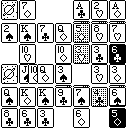
Jeu Klondike Solitaire pour les calculatrices monochromes fx-9860G et ultérieures (SH3/SH4).

Objectif
Déplacez toutes les cartes de la pioche et du plateau vers les quatre piles de famille, de sorte que chaque pile montre un roi.

Caractéristiques
• Retournez 1 ou 3 cartes à la fois
• Sélectionne des coups valides pour un jeu rapide
• Les cartes vers les familles en appuyant sur un seul bouton

Comment se Déplacer
• Utilisez ← → pour choisir un déplacement. La ou les cartes à déplacer seront ombrées, et l'emplacement où déplacer les cartes sera indiqué en couleurs inversées.
• Effectuez le déplacement en appuyant sur SHIFT ou EXE.
• Pour distribuer une ou plusieurs cartes dans la pile des pioche, appuyez sur F1.
• Pour déplacer automatiquement autant de cartes que possible vers les familles (du plateau et pioche), appuyez sur F6. Faites attention à ne pas utiliser cette fonction trop tôt dans la partie, car elle pourrait déplacer plus de cartes que souhaité.

Contrôles Standard
• OPTN : Voir les Options, ci-dessous
• ← → : Sélectionnez déplacer (les cartes sont affichées en couleur inverse)
• SHIFT : Déplacer une ou plusieurs cartes
• F1 : Retourner une ou plusieurs cartes à la fois
• F6 : Déplacer automatiquement les cartes vers les familles
• MENU : Menu principal
• AC : Éteindre

Contrôles pour fx-9860G Slim Uniquement
• OPTN : Voir les Options, ci-dessous
• ← → : Sélectionnez déplacer (les cartes sont affichées en couleur inverse)
• ^ : Déplacer une ou plusieurs cartes
• ↓ : Retourner une ou plusieurs cartes à la fois
• ↑ : Déplacer automatiquement les cartes vers les familles
• HELP : Aide Slim (anglais)
• MENU : Menu principal
• AC : Éteindre

Options
• F1 : Distribuer une nouvelle partie
• F2 : Retourner une carte à la fois pour la pioche
• F3 : Retournez 3 cartes à la fois
• F4 : Basculer le rétroéclairage
• F5 : Aide (anglais)
• F6 : Aide (français)

Voir Aussi
• Code source
• Klondike Solitaire pour Python

Un merci spécial à Lephenixnoir pour son aide à la traduction dans le jeu et la création/soutien de gint.

English description:

Klondike Solitaire game for fx-9860G and later monochrome calculators (SH3/SH4).

Goal
Move all cards from the waste and tableau to the foundations, so that each foundation pile shows a King.

Features
• Flip 1 or 3 cards at a time
• Selects valid moves for rapid play
• Move cards to foundations with a single button press

How to Move
• Use ← → to pick a move. The card or cards to move will be shaded, and the location to move the cards to will be shown in inverse colors.
• Perform the move by pressing either SHIFT or EXE.
• To deal a card or cards to the waste pile, press F1.
• To automatically move as many cards as possible to the foundations (from both the tableau and waste), press F6. Be careful using this too early in the game, as it might move more cards than desired.

Standard Controls
• OPTN: See Options, below
• ← →: Select move
• SHIFT: Move one or more cards
• F1: Flip a card or cards to waste
• F6: Automatically move cards to foundations
• MENU: Main Menu
• AC: Power off

Controls for fx-9860G Slim Only
• OPTN: See Options, below
• ← →: Select move (cards are shown in inverse color)
• ^: Move one or more cards
• ↓: Flip a card or cards to waste
• ↑: Automatically move cards to foundations
• F5: Slim help (English)
• MENU: Main Menu
• AC: Power off

Options
• F1: Deal a new game
• F2: Flip one card to waste at a time
• F3: Flip 3 cards to waste at a time
• F4: Toggle backlight
• F5: Help (English)
• F6: Help (French)

See Also
• Source code
• Klondike Solitaire for Python

Special thanks to Lephenixnoir for in-game translation assistance and creating/supporting gint.


Note sur 10 Commentaire Date de notation
9Voir le testLe 21.09.2022 à 13:04

Commentaires :


Mb88Hors ligneRédacteurPoints: 1374 Défis: 3 Message
Posté le 21-09-2022 à 08:41 | #
I'll try it, it looks great !
Mb88Hors ligneRédacteurPoints: 1374 Défis: 3 Message
Posté le 21-09-2022 à 13:07 | #
Please improve the controls but it's a really good game !
I leaved a test.
CalamariHors ligneMembrePoints: 595 Défis: 0 Message
Posté le 21-09-2022 à 15:47 | #
Mb88 a écrit :
Please improve the controls

Thanks for the test! I'm not too clear on what should be improved with the controls. Could you elaborate on what was confusing? Would an introductory interactive demo at the beginning solve it, or are the controls confusing even when you know how to use them?
Mb88Hors ligneRédacteurPoints: 1374 Défis: 3 Message
Posté le 21-09-2022 à 15:52 | #
I find that the controls are hard to memorize : I can't remember which F key is useful for what.
In Microsoft's Klondike it's very easy : you use the mouse to move the cards.
LephenixnoirEn ligneAdministrateurPoints: 25939 Défis: 174 Message
Posté le 21-09-2022 à 16:08 | #
How about adding some F-keys? I saw some on an earlier screenshot. Did they take up too much space on the screen?
Mb88Hors ligneRédacteurPoints: 1374 Défis: 3 Message
Posté le 21-09-2022 à 16:09 | #
No it's just hard to remember which one does what.
EDIT:
Sorry I just red Lephe's comment too fast.
CalamariHors ligneMembrePoints: 595 Défis: 0 Message
Posté le 21-09-2022 à 16:57 | #
Thanks for the feedback! I'm completely out of vertical pixels. When the OPTN menu is raised, the suits of the cards at the bottom are almost completely gone (just 1 pixel remains). For the bottom row I could possibly squeeze the suit to the right of the rank, but that probably wouldn't look great.

Another option, and I plan on trying this out, would be to replace the double selection process with a single selection. Instead of independently selecting from and to, the arrows would loop through all valid moves (pairs of from and to), including waste and foundations. Pressing SHIFT would then perform the currently selected move. This should simplify the controls. I'd still want a dedicated key for flipping cards and another for auto foundations, but (for the current key layout) F2, F6, and EXIT would no longer be needed.
CalamariHors ligneMembrePoints: 595 Défis: 0 Message
Posté le 23-09-2022 à 08:36 | #
Version 1.1 (not uploaded): Simplified the move selection process as per my above comment. Thank you Mb88 for your test and re-test of the new design.
Version 1.2: Added fx-9860G Slim support.
CalamariHors ligneMembrePoints: 595 Défis: 0 Message
Posté le 25-09-2022 à 21:26 | #
Version 1.3: Utilized new gint fx-9860G Slim support to remove keyboard input workarounds, allow proper En/Fr help on the Slim, and support Slim backlight and MENU key.

Version 1.4: Fixed Slim card flip bug and added an experimental option to power off the calculator by pressing AC.
CalamariHors ligneMembrePoints: 595 Défis: 0 Message
Posté le 03-11-2022 à 04:55 | #
Version 1.5:
  • Added backlight toggle (F4) on OPTN menu

Planète Casio v4.3 © créé par Neuronix et Muelsaco 2004 - 2026 | Il y a 200 connectés | Nous contacter | Qui sommes-nous ? | Licences et remerciements

Planète Casio est un site communautaire non affilié à Casio. Toute reproduction de Planète Casio, même partielle, est interdite.
Les programmes et autres publications présentes sur Planète Casio restent la propriété de leurs auteurs et peuvent être soumis à des licences ou copyrights.
CASIO est une marque déposée par CASIO Computer Co., Ltd