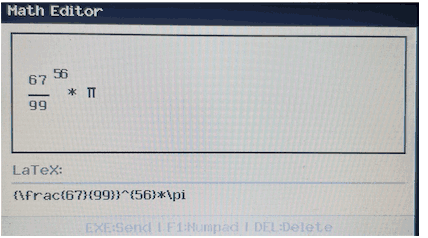
CGType transforme votre calculatrice Casio CG50/10/20 en un clavier USB HID pour saisir des expressions mathématiques en LaTeX. Connectez votre calculatrice à un PC via USB et utilisez son clavier physique pour entrer directement des formules mathématiques complexes dans n'importe quel éditeur de texte, éditeur LaTeX ou traitement de texte.
L'application propose deux modes : le Mode LaTeX, avec un éditeur d'équations arborescent de type vpam qui affiche votre expression au fur et à mesure que vous tapez (bien qu'il soit vraiment bâclé et en de nombreux points pire que l'original), et le Mode Pavé Numérique pour une saisie numérique rapide. Les expressions LaTeX sont générées automatiquement avec une syntaxe correcte pour les fractions, les exposants, les racines, les fonctions trigonométriques, etc. La calculatrice agit comme un clavier USB standard, elle est donc compatible avec toutes les applications sans nécessiter de logiciel spécifique sur votre ordinateur.
Vous pouvez appuyer sur shift + menu dans le mode LaTeX pour accéder à quelques paramètres.
(Le français n'étant pas ma langue maternelle, je m'excuse pour d'éventuelles erreurs.)
English description:
CGType transforms your Casio CG50/10/20 calculator into a USB HID keyboard for typing mathematical expressions in LaTeX. Connect your calculator to a PC via USB and use its physical keyboard to input complex math formulas directly into any text editor, LaTeX editor, or word processor.
The app features two modes: LaTeX Mode with a vpam-like tree-based equation editor that shows your expression as you type (though it's really botched and worse than the original in many ways), and Numpad Mode for quick numeric input. LaTeX expressions are generated automatically with proper syntax for fractions, exponents, roots, trig functions, and more. The calculator acts as a standard USB keyboard, so it works with any application without special software on your computer.
You may press shift + menu in the latex mode for some settings.
Nice idea! As I'm on Linux however, I can't really test how the HID part works but the expression editor is pretty good
In case you're using gint: are you using the dev branch? There is a small bug with gint's USB stack, and, since lsusb reports that there is 1 bNumInterfaces (while USB's sample HID example shows 2), that could explain why it doesn't work
This looks amazing! I've wanted HID classes in gint for the longest time but never got around to writing them. If you're willing/interested in submitting a PR, I'd be more than happy to get into it and merge.
After some debugging, I've noticed that the problem (at least on Linux, but I believe MacOS would be similar) was that the HID report descriptor was never sent
HID is kind of annoying since you have to pay attention to special GET_DESCRIPTORS, which gint's API doesn't seem to let you do easily, so I guess it is time to write up a proper PR...
Oh, and as a (nitpicky) side note, you should probably ask for a git.planet-casio.com account from @Lephenixnoir and move the gint-side changes to its own fork (and ideally the CGType code as its separate repository), as it would make attempts to merge much easier (and would also allow the community to just
giteapc install
it)
As for the padding, wouldn't the
GPACKED(1)
attribute have done the trick?
(I also feel like gint should have better support for unusual descriptor requests without having to code support for every class, but eh...)
Planète Casio est un site communautaire non affilié à Casio. Toute reproduction de Planète Casio, même partielle, est interdite.
Les programmes et autres publications présentes sur Planète Casio restent la propriété de leurs auteurs et peuvent être soumis à des licences ou copyrights.
CASIO est une marque déposée par CASIO Computer Co., Ltd