PythonExtra est un add-in Python alternatif pour (à ce stade) Graph 35+E II, Prizm et Graph 90+E. L'objectif est de fournir plus de fonctionnalités : modules standard, getkey(), fonctions de dessin plus performantes, etc.
Compile pour Graph 90+E (fx-CG 10/20/50) et Graph 35+E II (fx-9860G III)
Peu de RAM sur Graph 35+E II (c'est difficile d'en trouver sur ce modèle)
Un shell pas trop mal (saisie rapide, scrolling) avec de bonnes performances
Plein de modules standard
array, builtins, cmath, collections, io, math, random, struct, sys, time
Le module spécifique CASIO : casioplot (fidèle à part sur les polices)
Un nouveau module gint avec les fonctionnalités avancées de gint :
Pour l'instant, une bonne partie de <gint/display.h> et <gint/keyboard.h>
Donc getkey() (attente de touche) ainsi que keydown() (test instantané) !
Et des fonctions de dessin rapides comme dline() ou drect()
Le plan actuel :
Être sensiblement compatible avec l'appli Python officielle.
Pousser les fonctionnalités ajoutées pour vraiment relever le niveau de Python !
Si du temps de développement se débloque : support autres Graph mono (pas de promesses).
Updates et screenshots à venir. Je n'ai pas l'intention d'implémenter un million de fonctionnalités, juste ce qu'il faut pour s'assurer que ça ne finisse pas mal documenté et non maintenu comme CasioPython.
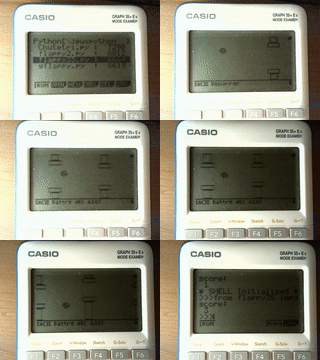
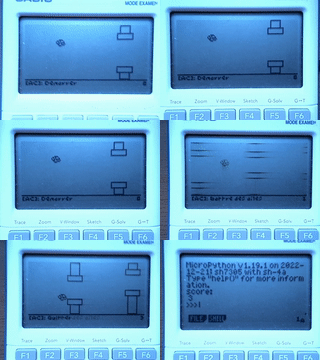
Dans l'exemple ci-dessous (réalisé par Mb88), un Flappy Bird déjà bien optimisé (dessin partiel etc, à gauche) est accéléré un bon gros coup en utilisant PythonExtra et le module gint pour le dessin (à droite).
Contexte historique
Aux journées APMEP 2022, redgl0w racontait comment le port MicroPython pour Numworks n'était finalement pas super difficile. Moi je parlais de comment un port maison résoudrait le problème de getkey(), et Critor m'a convaincu d'essayer sur-le-champ.
En fin de compte, j'ai clôné MicroPython Dimanche à midi et à 1 heure du matin j'avais un port fonctionnel avec getkey() sur ma Graph 90+E (que j'ai d'ailleurs montré à CASIO Lundi, pour la démo). Comme quoi, des fois ça marche tout seul !
(Enfin, le début marche tout seul. Faire une bonne UI et gérer tous les détails ensuite c'est une autre paire de manches !)
To embed an image, you can use the second item from the left on the editing toolbar. The usual way of adding images is putting them as an attached file to your message (limited to one per message), then copying the link to the file and editing your message to embed it.
Otherwise, you are right in that editing on-calc doesn't have many options. There are plans to implement an editor into PythonExtra, however not much has been done yet (work has moved on to the MQ emulator and the MPM for G100/Math+).
As for your editor, have you tested it on-calc ? "AI" (LLMs) are known to get a lot of details wrong about calculator programming, even when provided with documentation.
Apréciateur de Noctua moyen
Caltos : G35+EII, G90+E (briquée )
I tried to use Image Hosting to make the link, hope it can work.
About the AI part—I totally agree. I didn't just copy-paste the code; I've tested it thoroughly on my fx-CG50 and manually fixed some bugs the AI made. It's working fine for basic tasks now, though it’s still a bit simple.
I know it's not perfect, but hopefully it's a helpful tool for the community until the official editor is ready!
A bug was reported recently where gint incorrectly detects this particular OS version, I'll fix that and send you a g3a for testing (like today or tomorrow). We can see if that's the cause of your crash.
Lephenixnoir a écrit : Ok yeah turns out I'm stupid and I accounted for the Graph 90+E but not the fx-CG 50 in that build. Please try the attached build.
Well PythonExtra-201778.g3a appears to crash/brick calculator, manual reset from RESTART button was required to boot it again. Similar to what happened when I've tried beta 3.0.
Can I help you somehow? Some sort of calculator memory dump?
Does this gintctl build work (attached)? You should have the main menu. Try if F2 switches tabs. If not, try pressing keys near the top to see if any of them, that is not MENU or EXIT, leads to coming back to the menu.
Lephenixnoir a écrit : Does this gintctl build work (attached)? You should have the main menu. Try if F2 switches tabs. If not, try pressing keys near the top to see if any of them, that is not MENU or EXIT, leads to coming back to the menu.
Lephenixnoir a écrit : Sounds like something is... slightly wrong. What's your DateA/DateO? (turn off, OPTN+x10^+AC/ON, then F1, then 9 -- nothing gets deleted -- 4. VERSION)?
Os Ver 03.81.0202
DateO 2025.0911.1115
DateA 2025.0304.1404
Strange indeed, yet khicas50 appears to be working properly.
With access to a machine with that revision that'd probably be straightforward. Blind is a lot trickier. If someone can hop on a call with me and debug a bunch of gintctl builds live that might do it.
Well, I can try to help you, you can find me on Discord under the same nickname as here or I can invite you to my (experimantal) matrix server. As you prefer, I need to warn you that english is not my native language.
But why does Casio continue to make updates to the fx-CG50 when the fx-CG100 has been released?
Probably because some of the components reached their end of life, so they have to change the components to keep manufacturing the CG-50. Which they are still selling in many places.
Planète Casio est un site communautaire non affilié à Casio. Toute reproduction de Planète Casio, même partielle, est interdite.
Les programmes et autres publications présentes sur Planète Casio restent la propriété de leurs auteurs et peuvent être soumis à des licences ou copyrights.
CASIO est une marque déposée par CASIO Computer Co., Ltd


 Graph 35+E II /
  Prizm /
  Graph 90+E /
  Math+ /
  ClassPad : PythonExtra-pe-0.4.0-beta.zip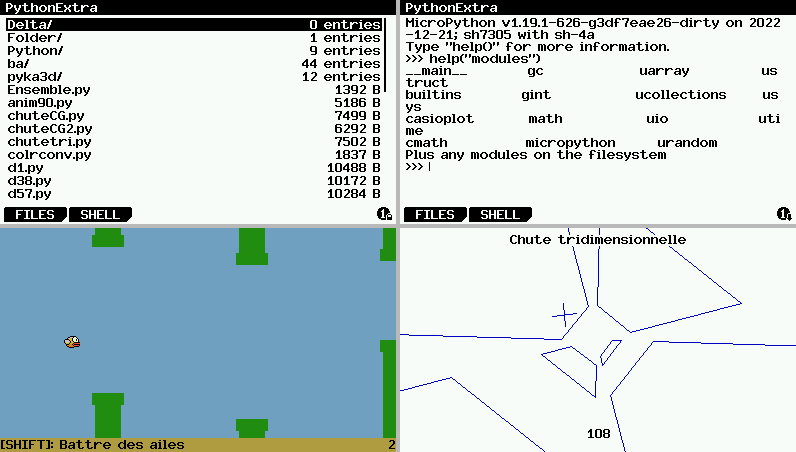


Citer : Posté le 17/01/2026 20:48 | #
To embed an image, you can use the second item from the left on the editing toolbar. The usual way of adding images is putting them as an attached file to your message (limited to one per message), then copying the link to the file and editing your message to embed it.
Otherwise, you are right in that editing on-calc doesn't have many options. There are plans to implement an editor into PythonExtra, however not much has been done yet (work has moved on to the MQ emulator and the MPM for G100/Math+).
As for your editor, have you tested it on-calc ? "AI" (LLMs) are known to get a lot of details wrong about calculator programming, even when provided with documentation.
Caltos : G35+EII, G90+E (briquée
Citer : Posté le 18/01/2026 02:34 | #
I tried to use Image Hosting to make the link, hope it can work.
About the AI part—I totally agree. I didn't just copy-paste the code; I've tested it thoroughly on my fx-CG50 and manually fixed some bugs the AI made. It's working fine for basic tasks now, though it’s still a bit simple.
I know it's not perfect, but hopefully it's a helpful tool for the community until the official editor is ready!
Citer : Posté le 18/02/2026 13:09 | #
When I launch PythonExtra, the screen turns white for a split second and then crashes.The OS number of my fx-CG50 is 3.81.0202
Citer : Posté le 18/02/2026 13:13 | #
A bug was reported recently where gint incorrectly detects this particular OS version, I'll fix that and send you a g3a for testing (like today or tomorrow). We can see if that's the cause of your crash.
Citer : Posté le 19/02/2026 23:07 | # | Fichier joint
Can you try the attached file?
Citer : Posté le 21/02/2026 14:30 | #
Can you try the attached file?
Hi, I've same hardware, same issue, os 03.81.202, PythonExtra just crashes, dev version you've sent doesn't make any difference
Citer : Posté le 22/02/2026 03:37 | #
yes,it makes no difference
Citer : Posté le 22/02/2026 11:56 | # | Fichier joint
Ok yeah turns out I'm stupid and I accounted for the Graph 90+E but not the fx-CG 50 in that build. Please try the attached build.
Citer : Posté le 22/02/2026 16:40 | #
Ok yeah turns out I'm stupid and I accounted for the Graph 90+E but not the fx-CG 50 in that build. Please try the attached build.
Well PythonExtra-201778.g3a appears to crash/brick calculator, manual reset from RESTART button was required to boot it again. Similar to what happened when I've tried beta 3.0.
Can I help you somehow? Some sort of calculator memory dump?
add inn md5:
4e8fc98e8302f8337b0cabac31c2c26e
Citer : Posté le 22/02/2026 17:32 | # | Fichier joint
Does this gintctl build work (attached)? You should have the main menu. Try if F2 switches tabs. If not, try pressing keys near the top to see if any of them, that is not MENU or EXIT, leads to coming back to the menu.
Citer : Posté le 22/02/2026 18:04 | #
Does this gintctl build work (attached)? You should have the main menu. Try if F2 switches tabs. If not, try pressing keys near the top to see if any of them, that is not MENU or EXIT, leads to coming back to the menu.
md5: 199d80df89a1feaf3d9c9e3397510a1a
Same as before, crashed. You cane see it in ~~attached~~ video.[video](https://youtube.com/shorts/7iPVn5wusZA)
Citer : Posté le 22/02/2026 20:37 | #
Sounds like something is... slightly wrong. What's your DateA/DateO? (turn off, OPTN+x10^+AC/ON, then F1, then 9 -- nothing gets deleted -- 4. VERSION)?
Citer : Posté le 22/02/2026 20:43 | #
Sounds like something is... slightly wrong. What's your DateA/DateO? (turn off, OPTN+x10^+AC/ON, then F1, then 9 -- nothing gets deleted -- 4. VERSION)?
Os Ver 03.81.0202
DateO 2025.0911.1115
DateA 2025.0304.1404
Strange indeed, yet khicas50 appears to be working properly.
Citer : Posté le 22/02/2026 20:44 | #
Ah, there's an updated boot, there should be some hardware difference then.
KhiCAS uses system APIs so it's not impacted.
Citer : Posté le 22/02/2026 21:40 | #
Ah, there's an updated boot, there should be some hardware difference then.
KhiCAS uses system APIs so it's not impacted.
Any chances you'll be able to port it for new version?
Citer : Posté le 23/02/2026 10:44 | #
With access to a machine with that revision that'd probably be straightforward. Blind is a lot trickier. If someone can hop on a call with me and debug a bunch of gintctl builds live that might do it.
Citer : Posté le 23/02/2026 13:31 | #
Well, I can try to help you, you can find me on Discord under the same nickname as here or I can invite you to my (experimantal) matrix server. As you prefer, I need to warn you that english is not my native language.
Citer : Posté le 24/02/2026 12:57 | #
This may have already been noticed, but it is the same boot as on the latest fx-CG100s (https://www.planet-casio.com/Fr/forums/topic18534-14-mpm-mod-add-ins-math.html#201051).
But why does Casio continue to make updates to the fx-CG50 when the fx-CG100 has been released?
(Sorry if there are any errors in English)
Citer : Posté le 24/02/2026 13:00 | #
Thanks Vilq, I sent a friend request on Discord.
Probably because some of the components reached their end of life, so they have to change the components to keep manufacturing the CG-50. Which they are still selling in many places.
Citer : Posté le 24/02/2026 21:05 | #
Avec l'aide de Vilq j'ai pu confirmer qu'il y a bien un changement d'écran et on a trouvé comment détecter les nouveaux écrans.
En fait sur la vidéo la calculatrice ne crashe pas c'est juste l'écran qui s'éteint et le programme continue de tourner.
Il reste à analyser le driver de l'OS pour comprendre ce qui doit être fait différemment par rapport aux anciens.
Citer : Posté le 24/02/2026 21:30 | #
On pourrait penser que c'est la meme chose qui se passe sur la Math+ / fxCG100 et qui a conduit à la création de l'OS 2.01