PythonExtra est un add-in Python alternatif pour (à ce stade) Graph 35+E II, Prizm et Graph 90+E. L'objectif est de fournir plus de fonctionnalités : modules standard, getkey(), fonctions de dessin plus performantes, etc.
Compile pour Graph 90+E (fx-CG 10/20/50) et Graph 35+E II (fx-9860G III)
Peu de RAM sur Graph 35+E II (c'est difficile d'en trouver sur ce modèle)
Un shell pas trop mal (saisie rapide, scrolling) avec de bonnes performances
Plein de modules standard
array, builtins, cmath, collections, io, math, random, struct, sys, time
Le module spécifique CASIO : casioplot (fidèle à part sur les polices)
Un nouveau module gint avec les fonctionnalités avancées de gint :
Pour l'instant, une bonne partie de <gint/display.h> et <gint/keyboard.h>
Donc getkey() (attente de touche) ainsi que keydown() (test instantané) !
Et des fonctions de dessin rapides comme dline() ou drect()
Le plan actuel :
Être sensiblement compatible avec l'appli Python officielle.
Pousser les fonctionnalités ajoutées pour vraiment relever le niveau de Python !
Si du temps de développement se débloque : support autres Graph mono (pas de promesses).
Updates et screenshots à venir. Je n'ai pas l'intention d'implémenter un million de fonctionnalités, juste ce qu'il faut pour s'assurer que ça ne finisse pas mal documenté et non maintenu comme CasioPython.
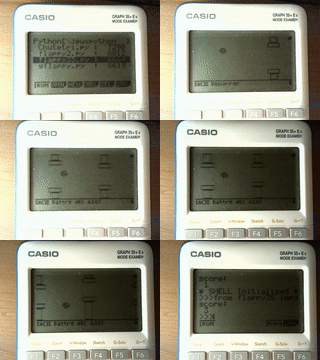
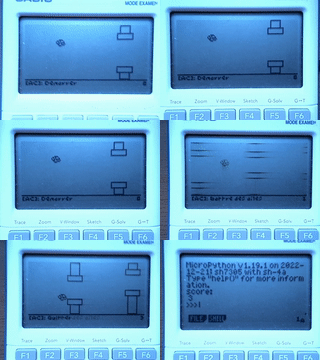
Dans l'exemple ci-dessous (réalisé par Mb88), un Flappy Bird déjà bien optimisé (dessin partiel etc, à gauche) est accéléré un bon gros coup en utilisant PythonExtra et le module gint pour le dessin (à droite).
Contexte historique
Aux journées APMEP 2022, redgl0w racontait comment le port MicroPython pour Numworks n'était finalement pas super difficile. Moi je parlais de comment un port maison résoudrait le problème de getkey(), et Critor m'a convaincu d'essayer sur-le-champ.
En fin de compte, j'ai clôné MicroPython Dimanche à midi et à 1 heure du matin j'avais un port fonctionnel avec getkey() sur ma Graph 90+E (que j'ai d'ailleurs montré à CASIO Lundi, pour la démo). Comme quoi, des fois ça marche tout seul !
(Enfin, le début marche tout seul. Faire une bonne UI et gérer tous les détails ensuite c'est une autre paire de manches !)
Regarding PythonExtra working on 3.80, I still have no such luck. I have downloaded and installed it multiple times. When I launch it, the screen turns white for a split second and then crashes. Do you have a working PythonExtra.g3a? Thanks so much.
If you indeed have 3.80.xx2x then it's a new OS that we don't know about. If you can dump it for us (before updating to a new version) that would be quite helpful. Did you buy the calculator with this OS pre-loaded or did you update it previously? gintctl (attached) has a feature for dumping the code. What system do you run on your computer? Windows, Mac, Linux?
I double-checked the number, and I'm sure that's what it is. I am going to attempt to get the system dump. What is the process for this using the gintctl, and how will it affect the calc?
Are you aware of the 3.81 update? I'm attaching screenshots to illustrate the process. Type fxcg50 update in Google.
Bsmith a écrit : I double-checked the number, and I'm sure that's what it is. I am going to attempt to get the system dump. What is the process for this using the gintctl, and how will it affect the calc?
Are you aware of the 3.81 update? I'm attaching screenshots to illustrate the process. Type fxcg50 update in Google.
Yes I am aware of but some verification of the empty RAM space may block you for some addins as this version is quite new. I recommended 3.80.1 as I know that everything work for this version. Sorry I don't have feedback for the newer version.
It would be very interesting if you could dump your 3.80.2 version, cause we don't have it in our radar and database.
There are only 10 types of people in the world: Those who understand binary, and those who don't ...
Hi, I'm testing my GRAPH MATH+, but I can't get Python Extra to work on it, even though it works on my Graph 90+E. I'm using Python Extra version 4.0, and my OS version is 2.10.xxxx. Thanks in advance. And good luck to everyone working on this wonderful project!
There's no risk of damaging your calculator at all, it's quite like backing up some files.
The easiest but slow way to do it is to use gintctl (attached in my earlier message), which has a "Memory dump" menu in the F2 tab. There you can select ROM, choose a fragment, then hit BFile. This will create a 1 MB file with part of the firmware. You have to do this for... likely 13 fragments. It's slow though, about a minute to export each file.
Doing it via USB is faster but it requires more setup on the computer side which would end up slower if you don't intend to use add-in development tools.
The gintctl crashed the calculator. It went to a black screen, and I had to remove the batteries and reinsert them for it to start working. I tried it multiple times.
As a side note, I'm using an Android device and USB Tools Pro, not a computer.
I'm a newcomer here and I recently discovered the amazing Python Extra project and was blown away by its potential. However, I felt the casio's python editing experience could use a little boost to make it even more convenient.
So, with some help from an AI assistant, I’ve put together a simple Python Editor specifically for the fx-CG50.
It’s still a "work in progress" and has some rough edges, but it already supports:
Syntax Highlighting
Function Templates.
Basic Auto-Indentation
I wanted to share it here as a small contribution to this awesome project. Since it's my first time posting and the tool is in its early stages, I’d love to hear your thoughts or bugs you might find!
Hope you find it useful!
PS: I’m not quite sure how to properly upload or embed images here. Could someone point me in the right direction?
To embed an image, you can use the second item from the left on the editing toolbar. The usual way of adding images is putting them as an attached file to your message (limited to one per message), then copying the link to the file and editing your message to embed it.
Otherwise, you are right in that editing on-calc doesn't have many options. There are plans to implement an editor into PythonExtra, however not much has been done yet (work has moved on to the MQ emulator and the MPM for G100/Math+).
As for your editor, have you tested it on-calc ? "AI" (LLMs) are known to get a lot of details wrong about calculator programming, even when provided with documentation.
Apréciateur de Noctua moyen
Caltos : G35+EII, G90+E (briquée )
Planète Casio est un site communautaire non affilié à Casio. Toute reproduction de Planète Casio, même partielle, est interdite.
Les programmes et autres publications présentes sur Planète Casio restent la propriété de leurs auteurs et peuvent être soumis à des licences ou copyrights.
CASIO est une marque déposée par CASIO Computer Co., Ltd


 Graph 35+E II /
  Prizm /
  Graph 90+E /
  Math+ /
  ClassPad : PythonExtra-pe-0.4.0-beta.zip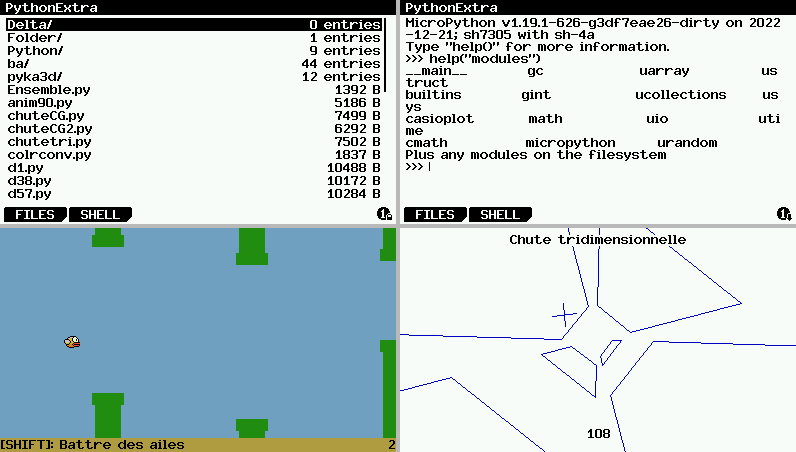


Citer : Posté le 18/12/2025 22:13 | #
Thanks so much!
Citer : Posté le 19/12/2025 22:20 | #
Regarding PythonExtra working on 3.80, I still have no such luck. I have downloaded and installed it multiple times. When I launch it, the screen turns white for a split second and then crashes. Do you have a working PythonExtra.g3a? Thanks so much.
Citer : Posté le 20/12/2025 15:53 | #
Hi, is that 3.80 or 3.80.1 that you are running on ?
3.80 is bugged as hell : https://www.planet-casio.com/Fr/forums/topic17319-5-crashs-des-addins-sur-os-380-fx-cg50-et-graph-90e-documentation.html
The addins were not supported correctly and Casio made a update 3.80.1 to solve that issue. Is that the same problem that you are facing ?
Can you please share the OS number (all numbers in the shape 3.80.xxxx), the xxx are really important.
Citer : Posté le 21/12/2025 00:39 | #
The OS number is 3.80.0222
Citer : Posté le 21/12/2025 10:25 | #
This is strange, can you please double check if it is 3.80.0222 or 3.80.2202
As you write, it would mean OS 3.80.2 in revision "international" (for fx-CG50). And to our knowledge 3.80.2 has never been published.
Anyhow, I recommand to use the 3.80.1 that you can find here : https://www.planet-casio.com/Fr/logiciels/voir_un_logiciel_casio.php?showid=149
Citer : Posté le 21/12/2025 10:29 | # | Fichier joint
If you indeed have 3.80.xx2x then it's a new OS that we don't know about. If you can dump it for us (before updating to a new version) that would be quite helpful. Did you buy the calculator with this OS pre-loaded or did you update it previously? gintctl (attached) has a feature for dumping the code. What system do you run on your computer? Windows, Mac, Linux?
Citer : Posté le 21/12/2025 13:47 | #
@Lephe, seems you forgot the attachment.
Citer : Posté le 21/12/2025 13:48 | #
Thanks.
Citer : Posté le 23/12/2025 00:54 | # | Fichier joint
I double-checked the number, and I'm sure that's what it is. I am going to attempt to get the system dump. What is the process for this using the gintctl, and how will it affect the calc?
Are you aware of the 3.81 update? I'm attaching screenshots to illustrate the process. Type fxcg50 update in Google.
Citer : Posté le 23/12/2025 00:54 | # | Fichier joint
Step 2
Citer : Posté le 23/12/2025 00:55 | # | Fichier joint
Step 3
Citer : Posté le 23/12/2025 00:55 | # | Fichier joint
Step 4
Citer : Posté le 23/12/2025 00:55 | # | Fichier joint
Step 5
Citer : Posté le 23/12/2025 11:11 | #
I double-checked the number, and I'm sure that's what it is. I am going to attempt to get the system dump. What is the process for this using the gintctl, and how will it affect the calc?
Are you aware of the 3.81 update? I'm attaching screenshots to illustrate the process. Type fxcg50 update in Google.
Yes I am aware of but some verification of the empty RAM space may block you for some addins as this version is quite new. I recommended 3.80.1 as I know that everything work for this version. Sorry I don't have feedback for the newer version.
It would be very interesting if you could dump your 3.80.2 version, cause we don't have it in our radar and database.
Citer : Posté le 25/12/2025 15:27 | #
Hi, I'm testing my GRAPH MATH+, but I can't get Python Extra to work on it, even though it works on my Graph 90+E. I'm using Python Extra version 4.0, and my OS version is 2.10.xxxx. Thanks in advance. And good luck to everyone working on this wonderful project!
Citer : Posté le 25/12/2025 15:31 | #
The Math+ doesn't have official add-ins support, you need MPM for that: https://www.planet-casio.com/Fr/forums/topic18534-2-mpm-mod-add-ins-math.html
MPM isn't yet compatible with 2.10, but we're working on it (slowly).
Citer : Posté le 25/12/2025 17:27 | #
What are the steps for dumping the 3.80.2? Would it make the device inoperable?
Citer : Posté le 25/12/2025 17:30 | #
There's no risk of damaging your calculator at all, it's quite like backing up some files.
The easiest but slow way to do it is to use gintctl (attached in my earlier message), which has a "Memory dump" menu in the F2 tab. There you can select ROM, choose a fragment, then hit BFile. This will create a 1 MB file with part of the firmware. You have to do this for... likely 13 fragments. It's slow though, about a minute to export each file.
Doing it via USB is faster but it requires more setup on the computer side which would end up slower if you don't intend to use add-in development tools.
Citer : Posté le 03/01/2026 16:26 | #
The gintctl crashed the calculator. It went to a black screen, and I had to remove the batteries and reinsert them for it to start working. I tried it multiple times.
As a side note, I'm using an Android device and USB Tools Pro, not a computer.
Citer : Posté le 17/01/2026 18:49 | # | Fichier joint
I'm a newcomer here and I recently discovered the amazing Python Extra project and was blown away by its potential. However, I felt the casio's python editing experience could use a little boost to make it even more convenient.
So, with some help from an AI assistant, I’ve put together a simple Python Editor specifically for the fx-CG50.
It’s still a "work in progress" and has some rough edges, but it already supports:
Syntax Highlighting
Function Templates.
Basic Auto-Indentation
I wanted to share it here as a small contribution to this awesome project. Since it's my first time posting and the tool is in its early stages, I’d love to hear your thoughts or bugs you might find!
Hope you find it useful!
PS: I’m not quite sure how to properly upload or embed images here. Could someone point me in the right direction?
Citer : Posté le 17/01/2026 20:48 | #
To embed an image, you can use the second item from the left on the editing toolbar. The usual way of adding images is putting them as an attached file to your message (limited to one per message), then copying the link to the file and editing your message to embed it.
Otherwise, you are right in that editing on-calc doesn't have many options. There are plans to implement an editor into PythonExtra, however not much has been done yet (work has moved on to the MQ emulator and the MPM for G100/Math+).
As for your editor, have you tested it on-calc ? "AI" (LLMs) are known to get a lot of details wrong about calculator programming, even when provided with documentation.
Caltos : G35+EII, G90+E (briquée