MQ : Émulateur add-ins universel
Posté le 28/05/2025 20:22
Parmi les
projets de 2025 il y a tout un plan pour préserver les contenus du site, notamment les vieux programmes. La base de programmes de Planète Casio n'est pas beaucoup maintenue et on ne traque pas vraiment ce qui est encore jouable ou pas.
Les projets d'émulateurs c'est pas nouveau, c.f.
*,
*,
* et j'en oublie. Initialement je pensais repartir d'un existant, mais finalement j'en ai commencé un from scratch en voyant le cahier des charges :
- Il faut pouvoir émuler à la fois les Graph mono et les Prizm et à la fois les SH3 et les SH4 ;
- Il faut que ça puisse tourner sur le site donc compiler vers WebAssembly et optimiser raisonnablement (téléphones etc. ont pas des perfs de dingue) ;
- Il faut émuler pas mal de trucs matériels, donc assez bas-niveau, pour bien couvrir les add-ins et potentiellement l'appli PRGM pour émuler les programmes Basic ;
- Et si on fait tout ça ce serait criminel de pas s'en servir pour développer/debugger, ce pour quoi une GUI plus grosse que juste l'écran est nécessaire (et/ou gdb).
Les détails techniques, pour ceux que ça intéresse, c'est : pur C, tourne sur
Azur par facilité (GUI en OpenGL avec
ImGui + compile pour Linux et WebAssembly), le décodeur est un arbre de
switch généré automatiquement et la mémoire est hiérarchique par blocs de 1 Mo, 4 ko, et 1 octet.
L'état actuel (Mai 2025) c'est : on peut faire tourner quelques add-ins sur CG, y'a des syscalls mais peu, y'a une partie du matériel émulé pour faire tourner gint ; en gros si vous prenez un add-in aléatoire ça va probablement pas marcher, mais pas loin.
Voici le dépôt et au passage à quoi ressemble l'interface : y'a tous les trucs techniques nécessaires pour debugger.
» Dépôt Git Lephenixnoir/mq «
» Instance Web (expérimentale) «
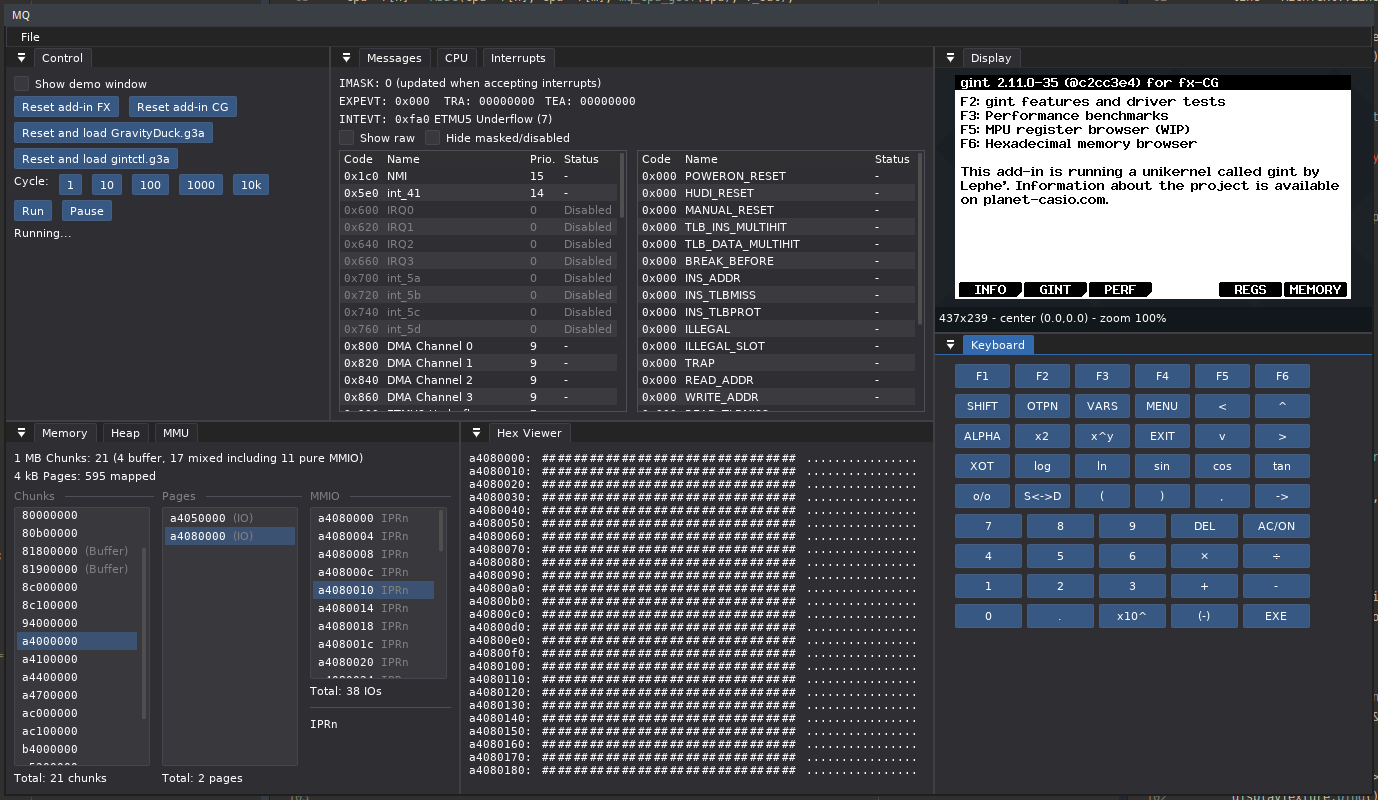
J'ai pas encore de build pour le web sur lequel vous pouvez cliquer et tester tout de suite, mais vous pouvez compiler depuis le dépôt.
Voilà plus de nouvelles bientôt j'espère.

 Fichier joint



Citer : Posté le 09/04/2026 21:14 | #
We intend to have such features in the future, but for now there's just a default fx-9860G II for mono (although the G-III screen is recognized) and an fx-CG 50 for the Prizms.
Citer : Posté le 18/08/2026 17:57 | #
I'm having a bit of trouble trying to run MQ on my Windows machine. I downloaded the web version but the addin hung, so I tried to install Azur. To do that, I downloaded and installed Emscripten, but all the Azur download commands fail (probably because I'm not using a Unix shell). What's the way to install/use MQ on Windows? Thanks. (The end goal is to take screenshots of my PythonExtra projects.)
Citer : Posté le 22/08/2026 17:20 | #
Oh, that'll take a slight detour.
- Web version, the add-in hung: can you still reproduce it? Please show me what add-in, what hung it, so we can debug it.
- Installing Azur doesn't require emscripten, only if you're going to build the web version (but no point it's already available).
- There's no Windows build currenty :/ mostly because neither I nor Yatis work on it. I haven't use Windows in like 10 years. You can use WSL to get a Linux environment and then build Azur and MQ as if on Linux. There you can run PythonExtra and take all the screenshots you want.
Citer : Posté le 23/08/2026 20:05 | #
web version
I just realized that could have been much clearer; I meant for the downloaded web (html) version. I boot index.html, the little loading bar pops up, and... nothing. Page is stuck on that.
In addition to that, in the web web version, I can't find how to upload .py files to run them, per:
To run scripts in pythonextra, put them in mq's parent directory, and you should see them in the file chooser when you start pythonextra.
Hope that's clearer.
I should really just find a way to use Microsoft 365 in linux, that's the only thing that's keeping me off of Mint...
Citer : Posté le 23/08/2026 22:18 | #
Oooh you can't just download it. I wished you could, but sadly browsers treat file:// and remote servers differently. For security you can do much less in file://, which includes notably the thread support MQ needs. If you really wanted to run it locally, you'd have to use the Python script provided in the repo, which runs a local web server with the right setup to convince the browser. See here. There's no benefit compared to https://www.planet-casio.com/mq/index.html though.
Which brings me to, yes, the web version doesn't support uploading files, which is stupid but is a missing feature >_>"
Hence why running the Linux version is a good fallback, the Linux version will load files from the current working directory directly.
Citer : Posté le 16/10/2026 06:39 | #
So I finally installed WSL and have it running, but tbh I'm completely lost on how to get mq built and running (never compiled a file, ever). Can anyone give a step-by-step on how to install it? For reference, my current environment is as it comes out of the box, i.e. should be clean, plus only nautilus, gedit, and cmake (with gcc15, I think...) and dependencies.
Thanks so much...
Citer : Posté le 16/10/2026 09:23 | #
Ok, it's not the easiest thing to build if you're not used to it. You'll have to first follow the instructions for Azur and then you can build MQ.
So, should be something like this. Clone Azur and get there:
cd Azur
Then build it:
cmake -B build-linux-3rdparty -S 3rdparty \
-DAZUR_PLATFORM=linux \
-DCMAKE_INSTALL_PREFIX="$AZUR_PATH_linux"
make -C build-linux-3rdparty install -j$(nproc)
cmake -B build-linux \
-DAZUR_PLATFORM=linux \
-DCMAKE_INSTALL_PREFIX="$AZUR_PATH_linux"
make -C build-linux install -j$(nproc)
Then same shtick with MQ :
git clone --recursive https://git.planet-casio.com/Lephenixnoir/mq
cd mq
cmake -B build-linux -DAZUR_PLATFORM=linux -DCMAKE_BUILD_TYPE=Release
make -C build-linux
And then run it as build-linux/mq.
As you can see I made the cd commands explicit. You should usually by comfortable dealing with that yourself. Most projects' instructions will omit cd and git clone but will otherwise be copy-paste grade.